Login
CookieInspector: what the buttons do
Most services below need data copied from your logged-in browser session. The [CookieInspector] extension (from DISCORD) does it in a few clicks. Open the service's site, log in, click the extension icon, then use:
| Button | What it reads | Used for |
|---|---|---|
| GET COOKIES | The cookies of the current site | Crunchyroll, Discovery+, HBO Max, Prime Video, Apple TV |
| GET STORAGE | Everything in the page's localStorage |
Anything else you need to look up by hand |
| GET TOKEN | Only access_token / refresh_token, found inside the page's localStorage |
Disney+ |
- The filter box keeps only the keys (or values) containing your text, e.g.
st, and COPY JSON copies exactly what is shown. - COPY JSON puts the JSON on a single line, so it can be pasted straight into
Conf/login.jsonwithout breaking it.
Crunchyroll: Get Cookies via Extension
Prerequisites
- Install the [CookieInspector] browser extension from DISCORD
Steps
- Open Crunchyroll and log in with your credentials.
- Click the CookieInspector extension icon in your browser toolbar.
- Click "Get Cookies" button.
- Click "Copy JSON" to copy the authentication data.
- Add it to
Conf/login.json:"crunchyroll": <paste_copied_json_here>
Mediaset Infinity
Steps
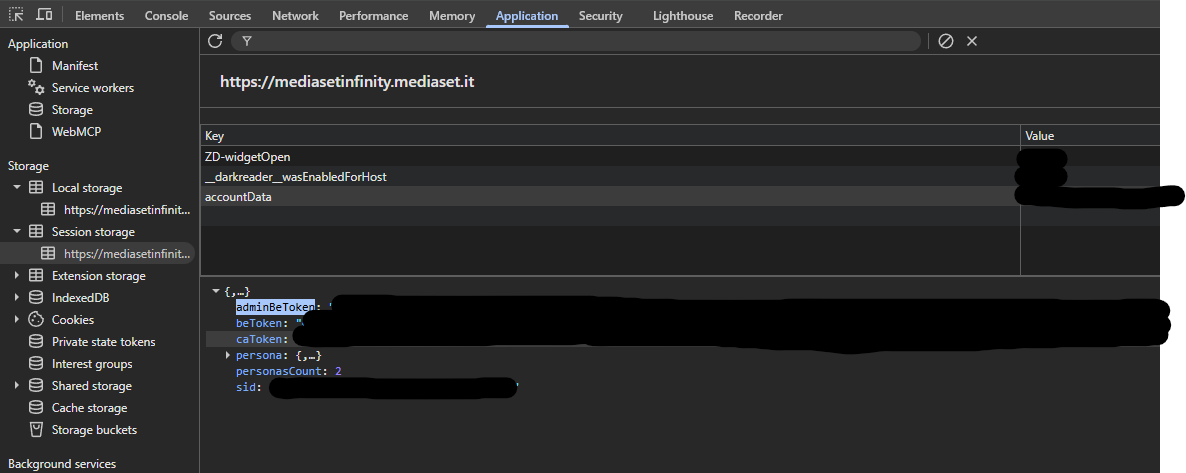
- Open Mediaset and log in.
- Open Developer Tools (F12).
- Navigate to the Application tab (or Storage in Firefox) → Session Storage → select the
mediasetinfinity.mediaset.itdomain. - Find the
accountDatakey. - Copy the value of the
adminBeTokenfield inside it.
Screenshot Reference
Discovery+ [EU]
Steps
- Open Discovery+ and log in.
- Click the CookieInspector extension icon, then GET COOKIES.
- Click "Copy JSON" and add it to
Conf/login.json(only thestcookie is used):"discoveryplus": <paste_copied_json_here>
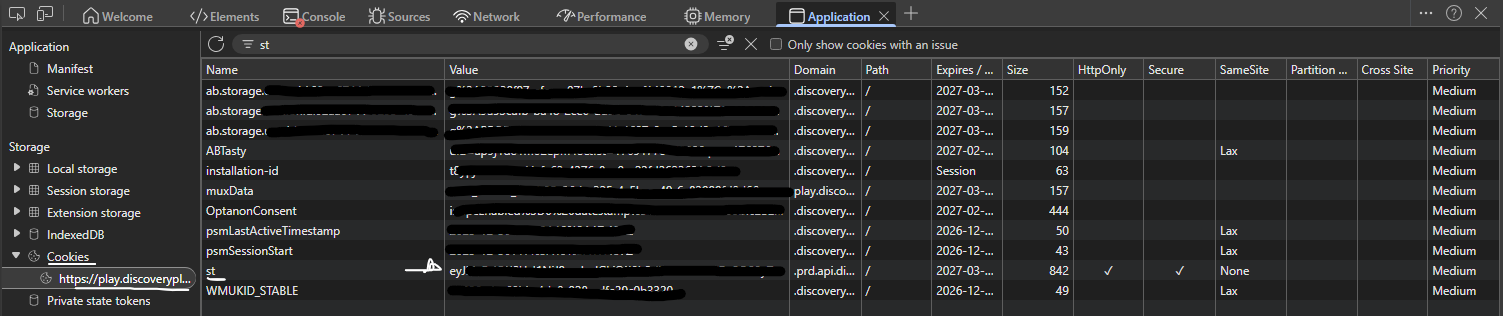
Without the extension: open Developer Tools (F12) → Application tab → Cookies, search for
the st cookie and copy its value into "discoveryplus": {"st": "<value>"}.
Screenshot Reference
HBO Max
Steps
- Open HBO Max and log in.
- Click the CookieInspector extension icon, then GET COOKIES.
- Click "Copy JSON" and add it to
Conf/login.json(only thestandsessioncookies are used):"hbomax": <paste_copied_json_here>
Without the extension, copy the st cookie value by hand as shown for Discovery+ and write it to
"hbomax": {"st": "<value>"}.
Disney+
Steps
- Open Disney+ and log in.
- Click the CookieInspector extension icon, then GET TOKEN. It reads the session out of the
page's storage and shows only
access_tokenandrefresh_token. - Click "Copy JSON" and add it to
Conf/login.json:"disney": <paste_copied_json_here>
Disney+ accepts access_token or token for the session token, and uses refresh_token to renew it. After the
first run the renewed values are saved back to the same disney section.
Amazon Prime Video [EU]: Get Cookies via Extension
Prerequisites
- Install the [CookieInspector] browser extension from DISCORD
Steps
- Open Prime Video and log in.
- Click the CookieInspector extension icon in your browser toolbar.
- Click "Get Cookies" button.
- Click "Copy JSON" to copy the authentication data.
- Add it to
Conf/login.json:"primevideo": <paste_copied_json_here>
Tubi TV: Plain Credentials
Unlike the cookie-based services above, Tubi TV authenticates with a plain email/password pair — no browser extension needed.
Steps
- Add your Tubi TV account credentials to
Conf/login.json:"tubi": { "email": "your@email.com", "password": "your-password" }
Without these set, search returns no results for this site.
Apple TV+: Get Cookies via Extension
Prerequisites
- Install the [CookieInspector] browser extension from DISCORD
Steps
- Open Apple TV+ and log in.
- Click the CookieInspector extension icon in your browser toolbar.
- Click "Get Cookies" button.
- Click "Copy JSON" to copy the authentication data.
- Add it to
Conf/login.json:"appletv": <paste_copied_json_here>